 Posted by
 Safari is Apple’s built-in web browser developed for macOS, iPhone, iPad, and other Apple devices. The browser is designed to provide fast browsing speeds, strong privacy protection, smooth performance, and deep integration with the Apple ecosystem.
Fast & Efficient Browsing:
- Quick page loading and smooth scrolling
- Efficient tab management and optimized rendering
- Hardware acceleration and energy-efficient performance
Privacy & Security Protection:
- Intelligent tracking prevention and private browsing mode
- Security alerts, privacy reports, and password management
- Anti-tracking technologies to enhance online safety
Apple Ecosystem Integration:
- iCloud synchronization of bookmarks, history, and tabs
- Cross-device tab syncing and Handoff support
- Integration with Apple Passwords and AirPlay
Productivity & Organization Tools:
- Tab groups, reading mode, and bookmark organization
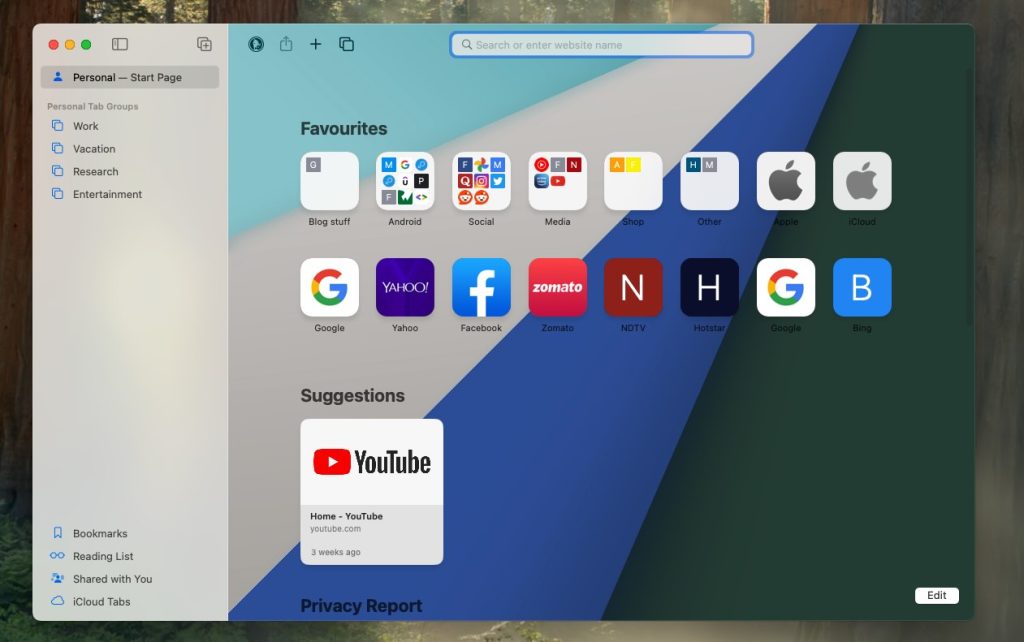
- Browser profiles, extension support, and customizable start page
Modern Web & Media Support:
- Full HTML5 support and streaming optimization
- Enhanced video playback and advanced graphics rendering
- Compatibility with modern web applications
Pros and Cons:
Pros:
- Excellent performance and battery efficiency on Apple devices
- Strong privacy and security features
- Smooth iCloud integration for cross-device use
- Lightweight, responsive interface optimized for Apple Silicon Macs
Cons:
- Limited extension library compared to Chromium browsers
- Smaller developer ecosystem than Chrome-based browsers
- Some websites are optimized better for other browsers
- No longer supported on Windows
- Advanced customization options are limited
Step-by-Step Guide:
- Launch Safari on your Mac, iPhone, or iPad.
- Customize your start page with favorites, frequently visited sites, and reading lists.
- Sign in to iCloud to sync bookmarks, passwords, open tabs, and browsing history.
- Organize tabs using tab groups, pinned tabs, profiles, and reading mode.
- Install supported browser extensions for productivity and security.
- Adjust privacy settings such as tracking prevention and private browsing.
- Continue browsing seamlessly across Apple devices via iCloud sync.
Alternatives:
- Google Chrome: Popular Chromium-based browser with extensive extensions.
- Mozilla Firefox: Privacy-focused browser with advanced customization.
- Microsoft Edge: Modern browser with productivity and AI features.
- Brave: Privacy-centered browser with built-in ad blocking.
- Opera: Browser with integrated productivity and media tools.
Compatibility and Performance:
- Supported on macOS, iPhone, iPad, and Apple Silicon Macs
- Requires modern Apple devices and updated operating systems
- Optimized for fast rendering, low memory use, and battery efficiency
- Responsive across Apple hardware for a smooth browsing experience
FAQs:
- What is Safari? Apple’s official web browser for macOS and iOS devices.
- Is Safari available for Windows? No, it is Apple-exclusive.
- Does Safari support extensions? Yes, through Apple’s ecosystem.
- Is Safari secure? Yes, with built-in privacy and security tools.
- Can Safari sync across devices? Yes, using iCloud.
- Does Safari support media streaming? Yes, optimized for modern streaming.
- Is Safari optimized for Apple Silicon? Yes, fully optimized.
Conclusion:
Safari is a fast, privacy-focused browser designed exclusively for Apple devices, offering smooth performance, strong security protections, and seamless integration across the Apple ecosystem.