 Posted by
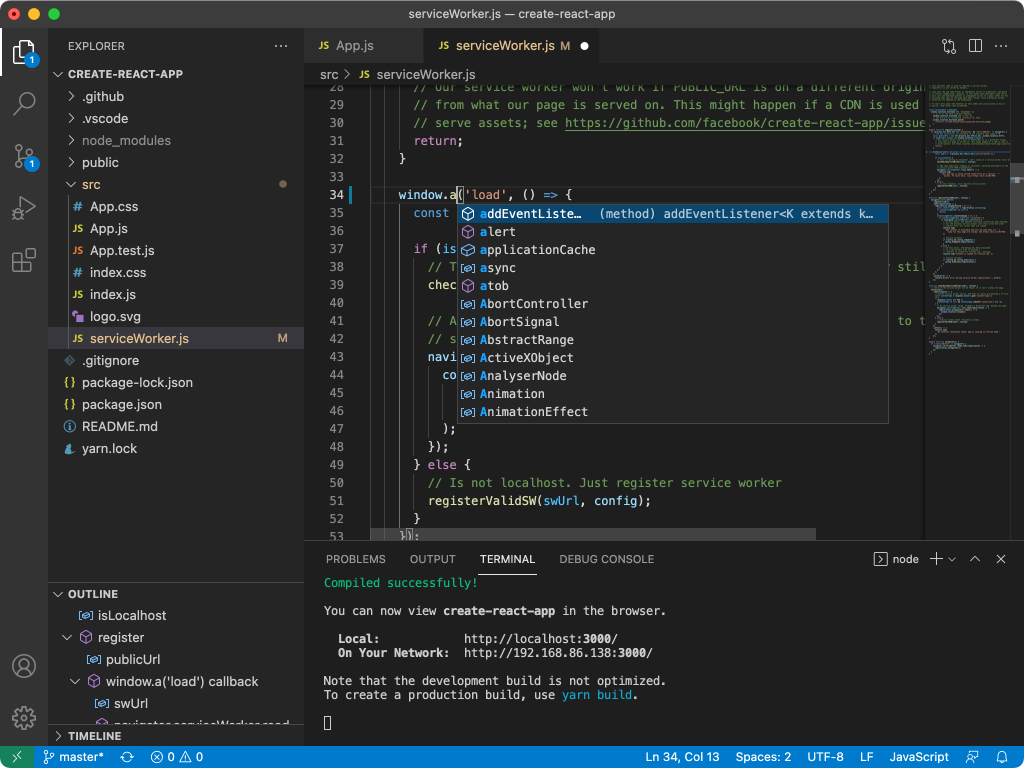
 Visual Studio Code, widely known as VS Code, is a modern source-code editor developed for programmers, software engineers, web developers, and technical professionals who need a fast, customizable, and efficient coding environment. The software combines lightweight performance with advanced development tools, making it one of the most widely used code editors in the software industry.
Main Features:
Intelligent Coding Tools:
- Auto-completion, syntax highlighting, and code suggestions
- Multi-cursor editing and automatic formatting
- Real-time error and warning detection
Extension Marketplace:
- Thousands of extensions for language support, themes, AI coding assistants, and workflows
- Customizable environment tailored to any development need
Built-In Debugging System:
- Breakpoint controls, variable inspection, and debug console
- Multi-language debugging and runtime monitoring tools
Git & Version Control Integration:
- Repository management, commit tracking, and branch control
- Merge conflict handling and source control visualization
Cross-Platform Development Support:
- Integrated terminal and remote development capabilities
- Cloud workflow integration and Docker compatibility
- Workspace synchronization across devices
Pros and Cons:
Pros:
- Lightweight, fast, and responsive
- Massive extension ecosystem for customization
- Beginner-friendly yet powerful for advanced users
- Integrated Git and debugging tools
- Cross-platform compatibility (Windows, macOS, Linux)
Cons:
- Heavy extension use can impact speed
- Advanced IDE features require additional setup
- Large projects may consume more memory
- Initial customization may be time-consuming
- Too many extensions can cause conflicts
Step-by-Step Guide:
- Install Visual Studio Code on your OS.
- Launch the editor and open the coding workspace.
- Install extensions for languages, themes, and tools.
- Create or open projects/workspaces.
- Write code using auto-completion, syntax highlighting, and formatting.
- Debug applications using built-in tools.
- Manage source control with integrated Git support.
Alternatives:
- Sublime Text: Fast, minimal text editor for developers
- JetBrains IntelliJ IDEA: Full-featured professional IDE
- Atom: Open-source, flexible code editor
- Vim: Highly customizable text editor for advanced users
- Nova: macOS-focused modern programming editor
Compatibility and Performance:
- Supports Windows, macOS, and Linux
- Requires modern processor, sufficient RAM, and updated OS
- Fast startup, responsive editing, and smooth extension handling
- Efficient debugging and stable multi-language support
FAQs:
- What is Visual Studio Code? A lightweight, versatile source-code editor.
- Which languages does it support? Many, including Python, JavaScript, TypeScript, C++, Java, PHP, Go, Rust, and more.
- Is it beginner-friendly? Yes, with a simple interface and advanced features.
- Does it support extensions? Yes, with a large marketplace.
- Can it debug code? Yes, with integrated multi-language debugging.
- Does it include Git integration? Yes, built-in Git tools for version control.
- Is it cross-platform? Yes, available on Windows, macOS, and Linux.
Conclusion:
Visual Studio Code is a powerful, customizable, and widely used code editor offering intelligent coding assistance, extensive extensions, integrated debugging, and seamless cross-platform workflows—ideal for developers of all experience levels.