 Posted by
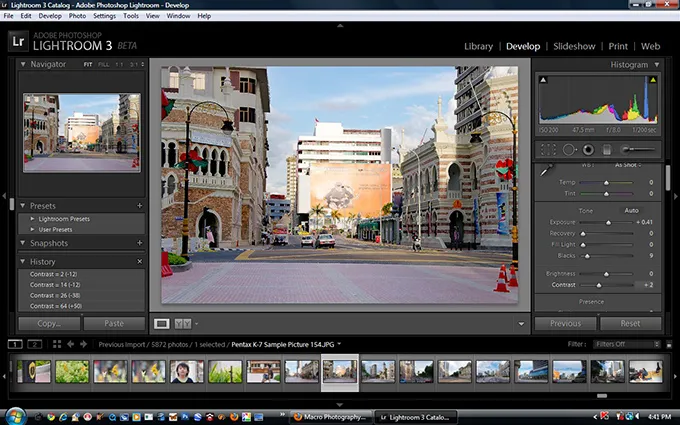
 Adobe Lightroom is a professional photo editing and image management application designed for photographers, creators, designers, and visual professionals who need a fast and organized photography workflow. The software combines advanced photo enhancement tools with intelligent image organization features, making it one of the most popular photography editing platforms in the creative industry.
Main Features:
Professional Photo Editing Tools:
- Exposure, color correction, and white balance adjustments
- Contrast, tone, sharpness, and detail recovery tools
- Clean, balanced, professional-quality image enhancements
RAW Image Processing:
- Non-destructive RAW editing for maximum quality
- Dynamic range recovery and highlight/shadow correction
- Professional color management throughout editing
Smart Photo Organization:
- Album and collection management with keyword tagging
- Metadata editing, search, filters, and rating systems
- Smart categorization for large photo libraries
Presets & Batch Editing:
- One-click presets and custom preset creation
- Batch editing and synchronized adjustments
- Consistent styling across large image collections
Cloud & Multi-Device Workflow:
- Cloud photo synchronization and cross-device editing
- Mobile workflow support and automatic backup
- Seamless editing continuity across desktop and mobile devices
Pros and Cons:
Pros:
- Excellent RAW photo editing support
- Professional photo organization system
- Beginner-friendly workflow with non-destructive editing
- Fast batch editing and preset application
- Smooth cloud synchronization across devices
Cons:
- Limited advanced graphic design and compositing tools
- Large image libraries can consume significant storage
- Exporting large batches may take time
- Some advanced retouching requires Photoshop
- Older hardware may experience slower performance
Step-by-Step Guide:
- Install Adobe Lightroom on your desktop or mobile device.
- Import photos or RAW files into your Lightroom library.
- Organize images using albums, keywords, ratings, and collections.
- Edit photos adjusting exposure, colors, sharpness, and tones.
- Apply built-in or custom presets for consistent looks.
- Export edited photos for social media, print, or portfolios.
- Sync and continue editing across devices seamlessly.
Alternatives:
- Capture One: Advanced RAW editing and color management
- Luminar Neo: AI-enhanced photography editor
- Darktable: Free RAW editor and image management tool
- Affinity Photo: Creative editor for photographers and artists
- Apple Photos: Built-in macOS photo organizer and editor
Compatibility and Performance:
- Supported on Windows, macOS (including Apple Silicon), Android, iPhone, and iPad
- Requires modern processors, sufficient RAM, SSD storage, and updated OS
- Optimized for smooth RAW processing, batch editing, and responsive tools
- Performs best on modern hardware with dedicated graphics support
FAQs:
- What is Adobe Lightroom? A professional photo editing and management app for photographers.
- Does Lightroom support RAW images? Yes, it offers advanced RAW editing.
- Is Lightroom beginner-friendly? Yes, with simplified workflows for all levels.
- Can it organize large libraries? Yes, with advanced search and tagging tools.
- Does it support presets? Yes, for fast and consistent editing.
- Is Lightroom available on mobile? Yes, with cloud sync across devices.
Conclusion:
Adobe Lightroom is a powerful, efficient photo editing and management tool tailored for photographers and creators. It excels in RAW processing, image organization, batch editing, and cloud workflows, making it an essential application for modern photography professionals.
Direct Download