 Posted by
 CleanMyMac is a macOS system maintenance and optimization application created to help users clean unnecessary files, improve performance, monitor system health, and manage storage more efficiently. The software combines cleanup utilities, security tools, performance optimization features, and storage management into a single easy-to-use platform.
Main Features:
System Cleanup & Junk Removal:
- Removes junk files, caches, temporary files, system logs, and duplicates
- Manages trash and frees up storage space
Performance Optimization:
- Controls startup apps and background processes
- Optimizes memory usage and monitors system performance
- Automates maintenance tasks to improve speed and responsiveness
Security & Malware Protection:
- Detects malware and scans for threats
- Cleans privacy data and browser history
- Manages permissions for safer macOS operation
Application Management:
- Complete app uninstallation without leftovers
- Manages extensions and detects large software
- Monitors application health
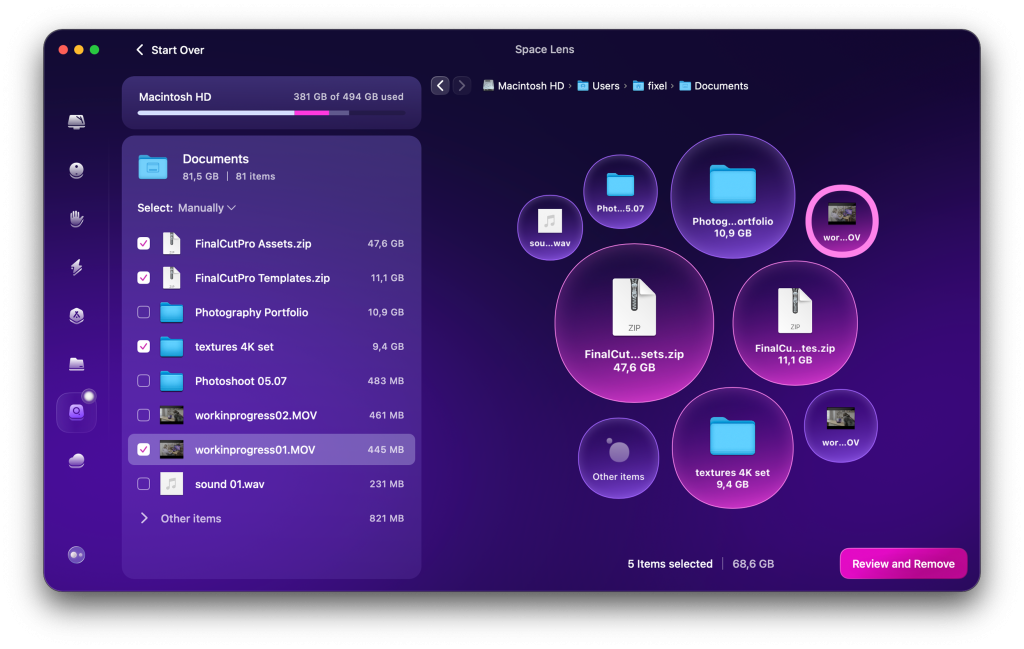
Storage Analysis & Management:
- Visualizes disk usage and identifies large files
- Provides storage organization and space management tools
Pros and Cons:
Pros:
- Easy and beginner-friendly interface
- Effective junk cleanup and performance tools
- Includes malware scanning and privacy protection
- Optimized for macOS and Apple Silicon Macs
Cons:
- Deep scans can be time-consuming on large drives
- Some features require system permissions
- Aggressive cleaning may remove useful cache
- Available only for macOS devices
Step-by-Step Guide:
- Install CleanMyMac on your Mac.
- Launch the app and access the dashboard.
- Run a full system scan for junk files, cache, logs, and large files.
- Review and select files to remove.
- Use optimization tools to manage startup apps and improve memory.
- Run security checks for malware and privacy cleanup.
- Schedule regular maintenance to keep your Mac optimized.
Alternatives:
- OnyX: Advanced Mac maintenance software
- DaisyDisk: Storage visualization and cleanup
- CCleaner: General system optimization tool
- Sensei: Mac performance monitoring and maintenance
- AppCleaner: Application uninstaller and leftover remover
Compatibility and Performance:
- Supports macOS on Apple Silicon and Intel Macs
- Requires modern macOS, SSD storage, and sufficient free space
- Fast scans and lightweight monitoring tools
- Optimized for smooth cleanup and storage analysis
FAQs:
- What is CleanMyMac? A macOS tool for system cleanup and performance optimization.
- Can it remove junk files? Yes, including caches, logs, and temporary files.
- Does it improve performance? Yes, via startup and memory optimization.
- Does it scan for malware? Yes, with built-in threat scanning.
- Is it safe for macOS? Yes, designed specifically for safe system maintenance.
- Is it optimized for Apple Silicon? Yes.
- Is it beginner-friendly? Yes, with a simple interface.
Conclusion:
CleanMyMac is an all-in-one macOS maintenance app that combines powerful cleanup, optimization, security, and storage management tools into an easy-to-use platform to keep Macs running smoothly.