 Posted by
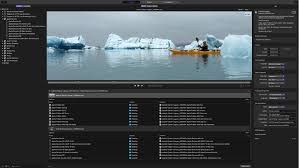
 Compressor is Apple’s professional media encoding and video compression software developed for filmmakers, video editors, broadcasters, and digital content creators. Built exclusively for macOS, the software helps users convert, compress, and export media files into optimized formats for streaming, broadcasting, social media, and professional production workflows Compressor .
Main Features:
Professional Media Encoding:
- Video compression and audio transcoding
- HEVC and ProRes support
- HDR video exports with 4K and 8K resolution support
- Resolution scaling and frame rate conversion
Batch Processing Workflow:
- Multi-file exporting with automated encoding queues
- Background processing and simultaneous exports
- Preset automation and workflow management
Custom Export Presets:
- Social media optimized presets
- YouTube, Apple devices, and broadcast-ready formats
- Customizable bitrate, resolution, and codec settings
Final Cut Pro Integration:
- Direct project exports from Final Cut Pro and Motion
- Shared encoding presets and background rendering
- Faster media delivery with synchronized workflows
Advanced Encoding Controls:
- Bitrate management and metadata editing
- Closed caption support and color space conversion
- Surround sound encoding and network encoding support
Pros and Cons:
Pros:
- Excellent optimization for Apple hardware and Apple Silicon
- Fast rendering and encoding performance
- Smooth integration with Final Cut Pro
- Easy batch processing workflow
- Supports professional media formats
Cons:
- Available only on macOS
- No built-in video editing tools
- Smaller feature set compared to enterprise encoders
- Advanced settings may be complex for beginners
- Limited collaboration features
- Not designed for full post-production editing
Step-by-Step Guide:
- Download and install Compressor on your Mac.
- Import media files such as videos, audio, motion graphics, or Final Cut Pro projects.
- Select an export preset tailored to your platform (YouTube, Instagram, broadcast, Apple devices).
- Customize encoding settings including resolution, bitrate, audio quality, codec, and frame rate.
- Create batch jobs for multiple files or export versions in a queue.
- Start encoding and monitor progress with hardware acceleration.
- Export and deliver files for streaming, broadcast, client delivery, social media, or archiving.
Compatibility and Performance:
- Platform: Full support on macOS; no support for Windows, iPadOS, or Android.
- Recommended Hardware: Apple Silicon Macs, MacBook Pro, Mac Studio with SSD storage.
- Recommended Specs: Modern macOS, minimum 8GB RAM, hardware acceleration support.
- Performance: Fast rendering, efficient hardware acceleration, smooth batch processing, optimized for Apple Silicon.
FAQs:
- What is Compressor? Professional media encoding and video compression software for macOS.
- Does it work with Final Cut Pro? Yes, with direct integration and shared presets.
- Can it export 4K and 8K video? Yes, including HDR and ProRes formats.
- Is it beginner-friendly? Yes, with presets, though advanced settings may require learning.
- Does it support batch processing? Yes, for simultaneous exports.
- Is it better than HandBrake? Compressor offers professional Apple ecosystem integration; HandBrake is free and simpler.
Conclusion:
Compressor is a top-tier media encoding solution for Apple users needing fast, professional video compression and export capabilities. It combines advanced encoding controls, batch processing, and seamless Final Cut Pro integration into a streamlined workflow optimized for Apple Silicon hardware.