 Posted by
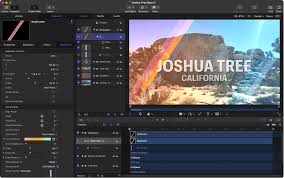
 Motion is Apple’s professional motion graphics and visual effects software built for video editors, animators, content creators, and filmmakers. Designed exclusively for macOS, the software helps users create cinematic animations, broadcast graphics, custom transitions, visual effects, and animated titles with smooth real-time performanceMotion.
Main Features:
Professional Motion Graphics:
- 2D and 3D text animation
- Animated titles and shape layers
- Particle systems and camera movement tools
- Real-time previews with lighting and shadow effects
Advanced Visual Effects:
- Green screen keying and motion tracking
- Masking tools and distortion filters
- Blur, glow effects, and color correction
- Object behaviors for dynamic effects
Real-Time Editing Performance:
- GPU acceleration and Apple Silicon optimization
- Smooth rendering engine and high-resolution support
- Efficient memory management with instant previews
Seamless Final Cut Pro Integration:
- Custom transitions and animated title templates
- Effect generators publishable directly to Final Cut Pro
- Shared workflows for professional video editing
Smart Animation Tools:
- Automatic motion behaviors and dynamic presets
- Smart object tracking and template automation
- Real-time parameter adjustments to speed up workflow
Pros and Cons:
Pros:
- Excellent optimization for Mac and Apple Silicon
- Fast real-time rendering and playback
- Smooth integration with Final Cut Pro
- Beginner-friendly animation workflow
- Powerful motion graphics tools
Cons:
- Available only on macOS
- Smaller plugin ecosystem compared to Adobe After Effects
- Limited advanced 3D animation capabilities
- Not ideal for large visual effects pipelines
- Limited collaboration tools
- Some effects require powerful hardware
Step-by-Step Guide:
- Install Motion from the Mac App Store.
- Create a new project: motion graphic, title animation, visual effect, transition, or generator.
- Import media files including videos, images, logos, graphics, and audio.
- Build animations with text, transitions, particle effects, and cinematic graphics.
- Apply effects like glow, blur, tracking, color correction, and keying.
- Use behaviors and presets to automate animations such as fades, rotations, and motion paths.
- Export finished animations or publish templates directly to Final Cut Pro.
Compatibility and Performance:
- Platform: Full support on macOS; not supported on Windows, iPadOS, or Android.
- Recommended Hardware: Apple Silicon Macs, MacBook Pro, Mac Studio with high-performance GPU.
- Recommended Specs: Modern macOS, SSD storage, minimum 8GB RAM (16GB+ for complex projects).
- Performance: Fast rendering, smooth playback, efficient GPU acceleration, optimized for M-series chips.
FAQs:
- What is Motion? Apple’s motion graphics and visual effects software for Mac users.
- Is it beginner-friendly? Yes, with easy-to-use behaviors and a clean interface.
- Does it integrate with Final Cut Pro? Yes, for titles, transitions, effects, and templates.
- Can it create 3D animations? Basic 3D text and camera effects, but not full 3D animation.
- Is it better than After Effects? Motion is more optimized for Mac and faster; After Effects has deeper VFX and plugin support.
- Can it run on Intel Macs? Yes, but Apple Silicon Macs offer better performance.
- Does it support plugins? Yes, including templates, effects, and select third-party plugins.
Conclusion:
Motion is a powerful motion graphics and visual effects tool for Apple users seeking fast, professional animation software that integrates tightly with Final Cut Pro. It balances real-time rendering, cinematic effects, intelligent automation, and Apple Silicon optimization to deliver a smooth creative experience.
Direct Download