 Posted by
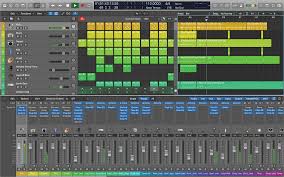
 Logic Pro is Apple’s advanced digital audio workstation created for musicians, producers, composers, podcasters, and audio engineers. Built exclusively for Mac and iPad, the software delivers a complete music production environment with professional recording tools, virtual instruments, AI-powered features, and studio-quality mixing capabilities.
Main Features:
Complete Music Production Studio:
- Multitrack recording and MIDI sequencing
- Drum programming and virtual instruments
- Automation editing and live loops
- Real-time audio processing
Advanced Recording & Editing:
- High-quality audio recording with take folders and track comping
- Flex Time and Flex Pitch for timing and pitch correction
- Quantization tools and low-latency monitoring
AI-Powered Creative Tools:
- AI Session Players and Smart Drummer
- Stem Splitter and Chord assistance
- Automatic groove matching and AI pitch correction
Professional Mixing & Mastering:
- Channel EQ, compressors, reverb, and delay effects
- Stereo imaging and loudness metering
- Automation controls and surround sound support
Massive Sound Library:
- Synthesizers, drum kits, bass instruments
- Orchestral sounds, guitar presets, cinematic effects
- Royalty-free loops suitable for all genres
Pros and Cons:
Pros:
- Excellent optimization for Apple hardware
- Powerful recording and mixing tools
- Large built-in sound library
- AI-assisted production features
- Smooth low-latency performance
- Professional-grade workflow
Cons:
- Available only on Apple devices
- Can be complex for beginners
- Large projects may consume significant storage
- Limited cloud collaboration tools
- Some advanced features require newer Macs
- Plugin organization can become cluttered
Step-by-Step Guide:
- Download and install Logic Pro on your Mac or supported iPad.
- Start a new project by selecting a template for music production, recording, beat making, podcast editing, or film scoring.
- Add audio and MIDI tracks for vocals, instruments, drums, synths, and sequencing.
- Record or import audio, loops, and samples with low latency.
- Edit your project using tools for timing, pitch, MIDI notes, and arrangement.
- Mix your project with EQ, compression, reverb, delay, automation, and stereo imaging.
- Export your music for streaming, podcasts, YouTube, social media, or professional mastering.
Compatibility and Performance:
- Supported Platforms: macOS (full), iPadOS (full), Windows and Android (not supported)
- Recommended Hardware: Apple Silicon Macs, MacBook Pro, Mac Studio, iPads with M-series chips
- Recommended Specs: Modern macOS, SSD storage, minimum 8GB RAM, professional audio interface
- Performance Highlights: Low-latency recording, fast plugin loading, efficient CPU use, stable multitrack sessions, optimized for Apple Silicon
FAQs:
- What is Logic Pro? A professional DAW for music production, recording, mixing, and mastering.
- Is it beginner-friendly? Yes, with templates and smart tools to help beginners.
- Can it record vocals? Yes, with professional-quality recording workflows.
- Does it include virtual instruments? Yes, with a vast library of sounds and loops.
- How does it compare to FL Studio? Logic Pro excels in recording and mixing; FL Studio is popular for beat making.
- Can it run on Intel Macs? Yes, but performance is better on Apple Silicon.
- Does it support plugins? Yes, including AU and many third-party plugins.
Conclusion:
Logic Pro is a powerful and versatile music production platform tailored for Apple users, offering professional recording, mixing, AI-enhanced creative workflows, and an extensive sound library—all optimized for high performance on Apple hardware.
One comment