 Posted by
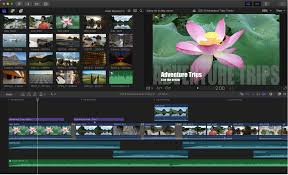
 Final Cut Pro is Apple’s professional video editing software built for filmmakers, YouTubers, content creators, and professional editors. Designed exclusively for the Apple ecosystem, the software combines advanced editing tools, cinematic color grading, motion graphics, and AI-powered workflows into a fast and optimized editing experienceFinal Cut Pro.
Key Features:
Advanced Video Editing:
- Magnetic Timeline for smooth clip organization
- Multicam editing
- Smart trimming and compound clips
- 360-degree and vertical video support
- Real-time previews
Professional Color Grading:
- Color wheels, curves, and masks
- HDR grading and tone mapping
- LUT support and white balance correction
- Video scopes for precision
Motion Graphics & Effects:
- Animated titles and cinematic transitions
- Green screen editing and object tracking
- Stabilization and slow-motion effects
- Support for third-party plugins and motion templates
Professional Audio Editing:
- Noise reduction and voice enhancement
- Audio synchronization and multichannel editing
- Surround sound support and sound effect integration
- Technology inspired by Logic Pro
AI-Powered Tools:
- Smart conform for social media formats
- Automatic captions and AI transcript search
- Beat detection and smooth slow-motion generation
- Intelligent object tracking
Pros and Cons:
Pros:
- Extremely fast on Apple Silicon Macs
- Beginner-friendly interface with a clean design
- Smooth rendering and high-resolution editing support
- Powerful professional editing tools
- Optimized specifically for Mac hardware
Cons:
- Only available on Apple devices
- Limited collaboration features
- Some advanced tools require newer hardware
- Smaller plugin ecosystem compared to Adobe
- Different workflow than Adobe Premiere Pro
Step-by-Step Guide to Get Started:
- Install Final Cut Pro from the Mac or iPad App Store.
- Create a New Project with Library, Event, and Project structure.
- Import Media including videos, audio, images, and music.
- Edit Using Magnetic Timeline—trim clips, rearrange, add transitions and music.
- Add Effects & Titles such as motion graphics, text animations, and filters.
- Color Grade Footage with curves, LUTs, HDR grading, masks, and color wheels.
- Export Your Video for platforms like YouTube, TikTok, Instagram, or professional production.
Compatibility:
- Supported Platforms: macOS (full), iPadOS (full), Windows and Android (not supported)
- Recommended Hardware: Apple Silicon Macs (M1, M2, M3), MacBook Pro, Mac Studio, M-series iPads
- Recommended Specs: Modern macOS, 8GB+ RAM, SSD storage, Metal-compatible GPU
Performance Highlights:
- Fast rendering and smooth timeline playback
- Efficient memory and real-time effects processing
- Excellent battery optimization
- Stable workflows for 4K and 8K video
Common Issues:
- Plugin-related slowdowns
- Timeline clutter in large projects
- Heavy storage usage
- Reduced performance on older Intel Macs
FAQs:
- What is Final Cut Pro? Professional video editing software for Apple users.
- Is it good for beginners? Yes, thanks to its intuitive interface and Magnetic Timeline.
- Does it support 4K/8K? Yes, including HDR workflows.
- Are plugins supported? Yes, with third-party effects and templates.
- How does it compare to Premiere Pro? Better optimized for Mac; Premiere offers more collaboration and cross-platform features.
- Can it run on Intel Macs? Yes, but performance is better on Apple Silicon.
- Is it good for social media editing? Yes, with smart conform and vertical video support.
Conclusion:
Final Cut Pro remains a top-tier video editing solution for Apple users, combining professional-grade tools, cinematic color grading, motion graphics, and AI-powered workflows for a smooth, high-performance editing experience.
One comment